As per usual, I'll start off by apologising about not writing enough blog posts and how I'll be better in the future. Although, this time there may actually be a chance of me sticking by my word as I've got a few posts lined up with talk about Ubuntu Netbook Remix, specifically the individual apps that make up the conversion of Gnome from desktop->netbook. There's been quite a few articles and reviews about UNR, but there seems to be some features that people have missed so I thought I'd be nice to get those code-paths tested out :-).
Currently I'm in Boston for the UI hackfest, which should be really cool and hopefully very fruitful. I'm here to pimp Awn and I guess Clutter too (although I doubt it needs pimping anymore :-). It will be nice to meet up and chat with other people who've worked on panels/docks/sidebars/applet server etc, and try and figure out how we can combine our work into something great for Gnome.
As you may have guessed, the planned hiatus from working on Awn didn't quite pan out. Actually, the very opposite happened and I've been busy rewriting Awn in a private branch to add all the features and fix all the bugs people having been asking for since the begining. To sum up the work, I'd say that the rewrite makes Awn a panel rather than a dock, and that's an important distinction. Some of the features that are beingworked on are not currently available in any other panel/dock and I hope will really push things forward in desktop experience.
You can follow the work on the rewrite in #awn on irc.freenode.net, it's not usable just yet as there's been a lot of breakage, but we're getting there and things have recently started to come together. I'll write a post detailing whats changed and the new features as soon as it's ready to be tested. It's funny,suddenly all my ideas for the desktop revolve around making Awn absolutely great :-).
Showing posts with label awn. Show all posts
Showing posts with label awn. Show all posts
Sunday, 5 October 2008


Friday, 9 May 2008
Bits & Pieces
As usual, I'm leaving far too long between each blog post, but I thought I'd make a small update until I get a chance to write up everything that's been going on:
- Canonical - The first couple of months have been awesome! Lots of cool things are happening here, everyone's very busy and there are some really exiting projects which will hopefully be in public very soon.
- UDS Prague - I'll be attending UDS this year, so ping me if your attending and would like to discuss various bling on desktop/mobile environments! Extra points if you support Manchester United, and want to go watch the Champions League final on the wednesday that week :-).
- Awn - Not much happening at the moment from my side. Hopefully this will change in a couple of weeks, at which point I hope to finish the remainder of non-composite support in trunk, and make a beta release for 0.4
- Random Hacking - Since late last year, most of my spare hacking time has been spent on Awn, which is great, but it means some of my other ideas/projects got left behind. So, I've been trying to remedy this by picking up these projects and starting to work on them once again. The two I'm concentrating on at the moment are Nautilus and Affinity. I hope to get some code out soon, so stay tuned!
Sunday, 7 October 2007
0.1 + 0.1 = ?

Well there you have it, Awn 0.2 has been released!
With over six months since the last release, you'd think we were working on something as complicated as Gnome, but I think there are enough new features to show where the time has gone ;-).
I'd like to highlight a few of the main features that have landed into trunk over the recent weeks, and others that I maybe haven't mentioned before.
Icon Effects
You can have user-selectable colours and a 3d-look bar, but the ability to choose whether your icons bounce like cartoon characters, spin like a coin, or have a spotlight cast on them has to be the best blingy feature :-D!
(you may need to click the blog title to see the video)
Awn Manager
After having to endure my simple preferences dialog (and my lack of updating it to reflect new features), a few brave souls from the forums decided to create a proper configuration dialog for Awn:

Together with wrapping all the gconf options, the ability to load/save and share your Awn theme was also included, which is a very cool feature. Themes have already started popping up in gnome-look.org!
Applets
I've been over applets before, but we've been working very hard to make sure there is a continuous look and feel across applets and the main launcher/task bar. As of now, 99% of the applets behave the same on the bar (including animations & reflections).

I'll be making a stable release of applets in the next few days, but you can get to them via launchpad if you can't wait!
Stability
In addition to new features, Awn has grown more and more stable. Many 'hacks' that were put in place in January have either been swapped for newly available APIs, or have been replaced with standard Gtk widgets (although you can't tell ;-).
Future
From now on, I hope to make more regular releases of Awn, especially as there are many more people involved now, and a lot of code is being written. Also, I may take some time off from writing code for Awn myself, as I'd really like to spend some time on Affinity and Arena, plus help out on some other projects.
Thanks
I'd just like to say a huge thanks to everyone who has been on the forums, wiki and launchpad trawling through questions/bugs etc, and all the tranlsators (43 languauges!). I'd also like to say special thanks to Jeff Fortin, Mike Jones, haytjes, Miika-Petteri Matikainen, Anthony Arobone, Ryan Rushton, Michal Hruby, Julien Lavergne, who have all picked up the slack when I couldn't work on Awn as much as I wanted to.
Thursday, 13 September 2007
How'd you like me now!
So in my tradition of one post per month (which, I know, needs to change), I present you with some updates from the world of Awn:
Applets
There have been lots of cool applets popping up, especially since the python bindings were committed a week or so ago.

Stacks

last.fm
Main menu
Launchpad
The move to launchpad has also created some very cool branches of Awn by other people which focus on new ideas, or new ways to implement existing ones. Below are two examples, the first being the libawn-effects branch, which migrates a lot of effects code from Awn to libawn, wraps a nice api around them, and adds a few more fancy effects:
The second branch concentrated on providing another approach to the usual linear arrangement of icons on the dock. Awn-curves puts icons on a slight curve which increases the feeling of depth:

Both are quite stable and are in line for a merge :-)
*Update* As usual, the videos have been stripped out, so if you want to see them you'll have to click on the post title above.
Applets
There have been lots of cool applets popping up, especially since the python bindings were committed a week or so ago.
Stacks
last.fm
Main menu
Launchpad
The move to launchpad has also created some very cool branches of Awn by other people which focus on new ideas, or new ways to implement existing ones. Below are two examples, the first being the libawn-effects branch, which migrates a lot of effects code from Awn to libawn, wraps a nice api around them, and adds a few more fancy effects:
The second branch concentrated on providing another approach to the usual linear arrangement of icons on the dock. Awn-curves puts icons on a slight curve which increases the feeling of depth:

Both are quite stable and are in line for a merge :-)
*Update* As usual, the videos have been stripped out, so if you want to see them you'll have to click on the post title above.
Monday, 30 July 2007
We are sailing...
...across the shore from code.google.com to launchpad.net!
Why?
Don't get me wrong, Google Code is great, and I still use it for Affinity and other projects, but Awn is getting larger and larger, in community and developers, and this needs some proper structure. Launchpad provides that structure incredibly well, with excellent road-mapping/bug reporting/feature requests/translation infrastructure, and we hope to make the most of it!
Show me the source!
http://www.launchpad.net/awn is the new home of Awn. Over the past few days, those belonging to the awn-core team have helped me move everything over to launchpad.
Development of Awn will be in Launchpad from now on, bug reports, feature requests (blueprints) and translations should be directed there too. The Awn page in launchpad has instructions on how to download the development version.
I am working on transferring the existing bugs from code.google.com to launchpad. If you have previously opened/commentated on a bug, and would like to help me out, you can create the corresponding bug in launchpad, and just leave a comment in the original bug report that you have done so :-D.
What now?
Well, there's been a burst of activity on the Awn forum, with patches coming at me left, right and center. Consequently, Awn has gained some new developers and bug-people, and we are working towards a 0.2 release, with a ton of ideas for 0.3! I'll make an other post outlining the new devels and their contributions soon.
Also, Awn currently has an universal applet menu-system, a brand new preferences application, mac-stacks applet and many more applets in development in the forum, with updates everyday! I am currently working on a way to get everyone working in the same place, so we can have a awn-applets release along side the main Awn release, but more on that later.
I think that's it for now :-).
Why?
Don't get me wrong, Google Code is great, and I still use it for Affinity and other projects, but Awn is getting larger and larger, in community and developers, and this needs some proper structure. Launchpad provides that structure incredibly well, with excellent road-mapping/bug reporting/feature requests/translation infrastructure, and we hope to make the most of it!
Show me the source!
http://www.launchpad.net/awn is the new home of Awn. Over the past few days, those belonging to the awn-core team have helped me move everything over to launchpad.
Development of Awn will be in Launchpad from now on, bug reports, feature requests (blueprints) and translations should be directed there too. The Awn page in launchpad has instructions on how to download the development version.
I am working on transferring the existing bugs from code.google.com to launchpad. If you have previously opened/commentated on a bug, and would like to help me out, you can create the corresponding bug in launchpad, and just leave a comment in the original bug report that you have done so :-D.
What now?
Well, there's been a burst of activity on the Awn forum, with patches coming at me left, right and center. Consequently, Awn has gained some new developers and bug-people, and we are working towards a 0.2 release, with a ton of ideas for 0.3! I'll make an other post outlining the new devels and their contributions soon.
Also, Awn currently has an universal applet menu-system, a brand new preferences application, mac-stacks applet and many more applets in development in the forum, with updates everyday! I am currently working on a way to get everyone working in the same place, so we can have a awn-applets release along side the main Awn release, but more on that later.
I think that's it for now :-).
Saturday, 14 July 2007
So now that we have some depth...
Apparently, if you don't pay attention to your projects forums for more than a week, something beautiful will happen...
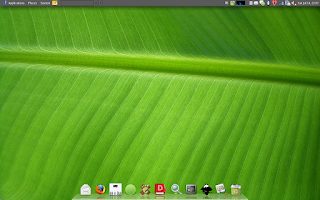
Yes, that's Awn svn, in all its 3D and reflective glory :-). I'd like to say a huge thanks to haytjes & nablaa from the forums, who managed to make their patches work together to create this effect. There are also a buch of other fixes in svn, so its well worth the upgrade.
As we all like videos, here's one of the reflection in action:
I've recently got a bunch of help from people for different things regarding Awn (thank you to you all), this should see development become quicker, and bug fixes faster. It'll also mean that I can make a proper roadmap, now that I have some help in achieving it!
In other news
There's a bunch of cool stuff I need to blog about, and as soon as I get some time, I will :-). I'm off to Guadec tomorrow, so there won't be much stuff happening code wise, but I do have an Awn-related surprise for you all when I get back this weekend ;-).
Update
As pointed out, it may help if I told you how to actually get Awn looking like this :-/. You need to change two gconf keys (UI coming soon). For the perspective, navigate to /apps/avant-window-navigator/bar/bar_angle, and set it to 45. For reflection, navigate to /apps/avant-window-navigator/bar/icon_offset, and set it to 18. Restart Awn and enjoy!

Yes, that's Awn svn, in all its 3D and reflective glory :-). I'd like to say a huge thanks to haytjes & nablaa from the forums, who managed to make their patches work together to create this effect. There are also a buch of other fixes in svn, so its well worth the upgrade.
As we all like videos, here's one of the reflection in action:
I've recently got a bunch of help from people for different things regarding Awn (thank you to you all), this should see development become quicker, and bug fixes faster. It'll also mean that I can make a proper roadmap, now that I have some help in achieving it!
In other news
There's a bunch of cool stuff I need to blog about, and as soon as I get some time, I will :-). I'm off to Guadec tomorrow, so there won't be much stuff happening code wise, but I do have an Awn-related surprise for you all when I get back this weekend ;-).
Update
As pointed out, it may help if I told you how to actually get Awn looking like this :-/. You need to change two gconf keys (UI coming soon). For the perspective, navigate to /apps/avant-window-navigator/bar/bar_angle, and set it to 45. For reflection, navigate to /apps/avant-window-navigator/bar/icon_offset, and set it to 18. Restart Awn and enjoy!
Tuesday, 19 June 2007
And the others thought they had caught up...
hate to depress you again boys, but Awn just keeps getting better and better :-p.
No long time no blog, eh? Don't worry though, that's unlikely to happen again, in fact, I'm sure you'll be sick of me always taking up precious space on PGO with my transparent this and three-dimensional that!
So,
a) how has Awn got better and
b) why am I so happy about it?
Many people already know the answer to (a), latest Awn has full applets support! Yes, that means you can have a trash applet, workspace switcher, and all those other things which you missed from your bottom gnome-panel. I have included a Workspace switcher applet, a Trash applet and a Separator applet in Awn. More to come from me, plus I know of others working on some cool stuff (more on that below).
So, whats the best way to describe this 'applets' malarkey? Well, with a screenshot, of course:

Oh, the main Launcher/Window manager is also an 'applet' (albeit an internal one). So you can position other applets around it.
Okay, moving on, the reason why I am so happy about this feature (over anything else), is that I believe we will now see some really cool stuff for Awn. There have been so many ideas floating around for months, which go from simple applets, to the extravagant (which is pretty easy to do with the excellent Empathy.
I would also love to see some cross-over happening with Gimmie, especially embedding its panel-applet into Awn (blinged up, of course :-).
Anyway, before we get there, I still need to make the applets system a bit more robust, and try and move as much as I can into libawn, so other applets can use colour settings etc, but this is a great start!
P.S. Can I just say thanks to everyone on the forums, bug reporters, and those who leave comments here, they have been really patient, plus they have been invaluable in giving feedback.
No long time no blog, eh? Don't worry though, that's unlikely to happen again, in fact, I'm sure you'll be sick of me always taking up precious space on PGO with my transparent this and three-dimensional that!
So,
a) how has Awn got better and
b) why am I so happy about it?
Many people already know the answer to (a), latest Awn has full applets support! Yes, that means you can have a trash applet, workspace switcher, and all those other things which you missed from your bottom gnome-panel. I have included a Workspace switcher applet, a Trash applet and a Separator applet in Awn. More to come from me, plus I know of others working on some cool stuff (more on that below).
So, whats the best way to describe this 'applets' malarkey? Well, with a screenshot, of course:
Oh, the main Launcher/Window manager is also an 'applet' (albeit an internal one). So you can position other applets around it.
Okay, moving on, the reason why I am so happy about this feature (over anything else), is that I believe we will now see some really cool stuff for Awn. There have been so many ideas floating around for months, which go from simple applets, to the extravagant (which is pretty easy to do with the excellent Empathy.
I would also love to see some cross-over happening with Gimmie, especially embedding its panel-applet into Awn (blinged up, of course :-).
Anyway, before we get there, I still need to make the applets system a bit more robust, and try and move as much as I can into libawn, so other applets can use colour settings etc, but this is a great start!
P.S. Can I just say thanks to everyone on the forums, bug reporters, and those who leave comments here, they have been really patient, plus they have been invaluable in giving feedback.
Tuesday, 30 January 2007
awn - update
Just updated svn with new code which drops the need for a patched libwnck, as it talks directly to X (thanks to some copy-and-paste from the libwnck source ;). It, however, does need testers to make sure it is all working properly.
Now, on to the smart launchers!
Now, on to the smart launchers!
Monday, 29 January 2007
avant-window-navigator initial release!
Finally! avant-window-navigator-0.1.1 is out the door, and after some teething pains, all seems well.
To help people grasp the idea a little better, I have posted some screenshots here.
Also, I have made a screencast (download awn-demo.ogg) which gives you an idea of how Awn works/looks when you are using it (it was my first ever screencast, so forgive the lack of direction :).
If you are using Awn, and hopefully enjoying it, I would love to here from you regarding what features you'd like to see, and/or any ideas regarding the visuals.
To help people grasp the idea a little better, I have posted some screenshots here.
Also, I have made a screencast (download awn-demo.ogg) which gives you an idea of how Awn works/looks when you are using it (it was my first ever screencast, so forgive the lack of direction :).
If you are using Awn, and hopefully enjoying it, I would love to here from you regarding what features you'd like to see, and/or any ideas regarding the visuals.
Subscribe to:
Posts (Atom)


